

Help needed with completing your details?
Clear step-by-step explanation
Do it yourself or get help
Have you received a message from us asking you to complete your details? Open the ABN AMRO app on your phone or Internet Banking on your laptop. This page explains how you can easily follow the steps on your own or with someone you trust. Always complete your details in your secure environment.
Having trouble? Read on to see how we can help.

What else is needed, and why?
If something happens to your phone, you need to be able to block the ABN AMRO app and reactivate it. Because of a change in the app and Internet Banking, you now need a password to do this.
You need to use your email address and password if:
- your phone is lost or stolen
- you buy a new phone
- you download the app again
If we already have your email address, it will be filled in automatically. You only need to choose a password.
Open the ABN AMRO app or Internet Banking

The quickest way to complete your details is in the app. Would you rather do it on your laptop or PC? Use the app to log in to Internet Banking.
Tap the bell icon for Messages
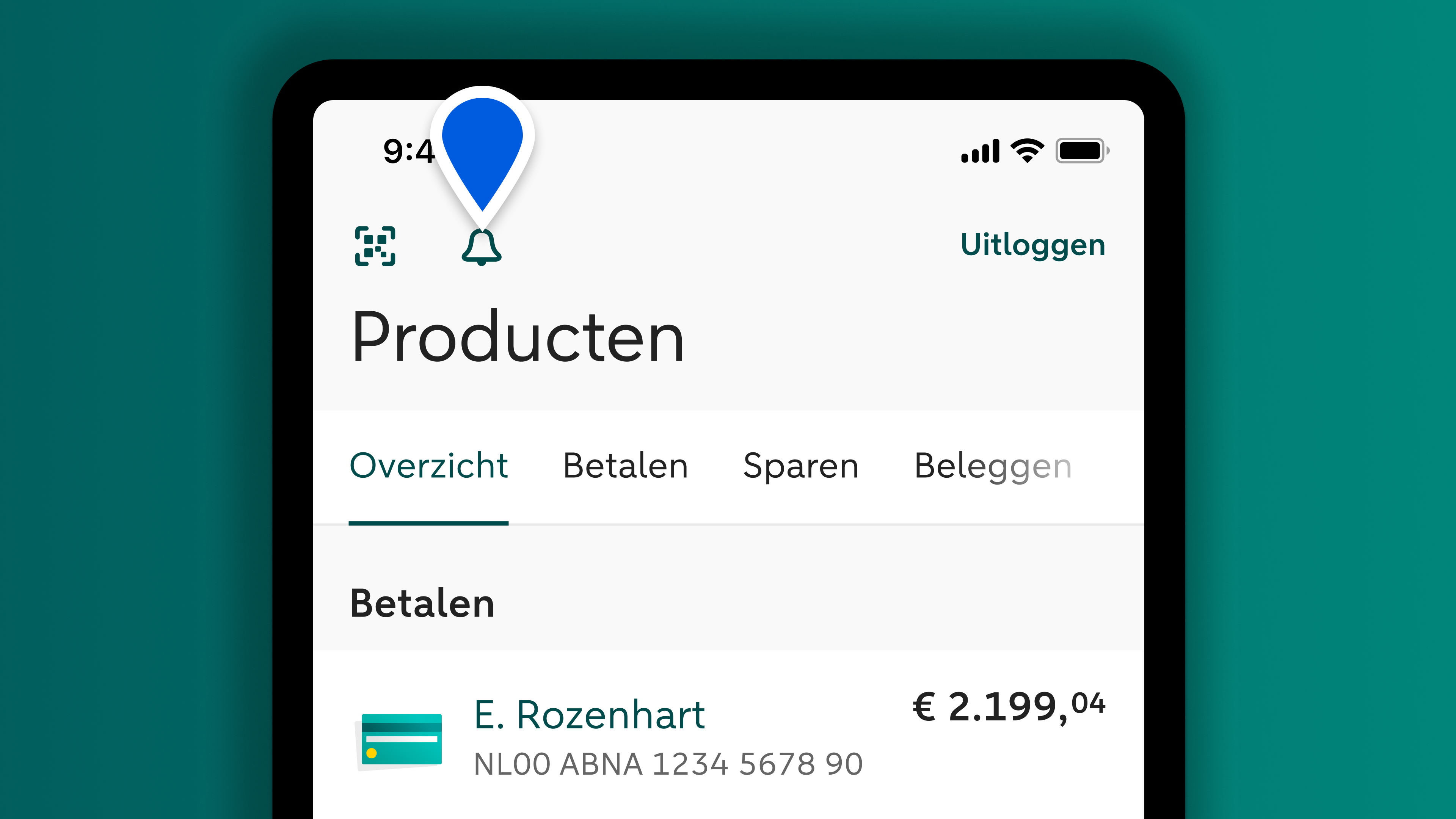
Open the message: Important: complete your details and follow the steps. It will only take you a few minutes.

The way you log in for your daily banking will stay the same
Your password does not replace your 5-digit identification code. Save or remember your password in case you need it again later.
Step-by-step guide: completing your details
Step 1: Check your email address
If we already have your email address, it will be filled in automatically. If it is correct, tap Yes, continue. Do you want to change your email address or enter one for the first time? Then tap the input field.
More information
Do you sometimes get help with your banking? Then it is important that you enter a unique email address. This means an email address that only you use with ABN AMRO. The email address will be linked to your name and other personal data. So make sure:
- you are the only person who uses the email address you enter with ABN AMRO.
- you personally have access to the email address.
- your email address contains no typing errors.
Step 2: Enter your verification code
Have you pressed Yes, continue or entered a new email address? Then you will receive a one-time verification code.
More information
A verification code is made up of 6 digits. You can copy it from the email you receive and paste it into the input field.
- Copy the verification code from your email to avoid entering the code incorrectly.
- It may take a little while for the email with the verification code to arrive. If it does not arrive, check your spam folder.
- If you have not received an email, tap the back arrow and check if there is a typing error in your email address.
Step 3: Choose a password
You need to choose a password for your email address. You need to use this password if you want to block the ABN AMRO app if your phone is lost or stolen. In future, you will also need your password to activate the ABN AMRO app on a new device.
More information
Choose a password that you do not use anywhere else. Under the input field, you can see which characters a strong password must contain. Do you want to store your password securely so you do not have to remember it? Use the save function on your phone.
- Long passwords are stronger. For example, use a line from your favourite song, film or poem.
- Do not use this password anywhere else.
- If your password is not strong enough, you will see this automatically.
Step 1: Check your email address
If we already have your email address, it will be filled in automatically. If it is correct, tap Yes, continue. Do you want to change your email address or enter one for the first time? Then tap the input field.
More information
Do you sometimes get help with your banking? Then it is important that you enter a unique email address. This means an email address that only you use with ABN AMRO. The email address will be linked to your name and other personal data. So make sure:
- you are the only person who uses the email address you enter with ABN AMRO.
- you personally have access to the email address.
- your email address contains no typing errors.
Step 2: Enter your verification code
Have you pressed Yes, continue or entered a new email address? Then you will receive a one-time verification code.
More information
A verification code is made up of 6 digits. You can copy it from the email you receive and paste it into the input field.
- Copy the verification code from your email to avoid entering the code incorrectly.
- It may take a little while for the email with the verification code to arrive. If it does not arrive, check your spam folder.
- If you have not received an email, tap the back arrow and check if there is a typing error in your email address.
Step 3: Choose a password
You need to choose a password for your email address. You need to use this password if you want to block the ABN AMRO app if your phone is lost or stolen. In future, you will also need your password to activate the ABN AMRO app on a new device.
More information
Choose a password that you do not use anywhere else. Under the input field, you can see which characters a strong password must contain. Do you want to store your password securely so you do not have to remember it? Use the save function on your phone.
- Long passwords are stronger. For example, use a line from your favourite song, film or poem.
- Do not use this password anywhere else.
- If your password is not strong enough, you will see this automatically.

Need more help?
Are you still having trouble, even with help from someone you trust? Or are you stuck on one of the steps? We are happy to help if you are not able to complete your details. You can chat with us or call us.

Ask chatbot Anna your question right away
Chatbot Anna can answer your questions day and night. If Anna is not able to help, you will automatically see the phone number you need to call. That way you will get the right help directly.

Why do I need to complete my details and what does it mean for me?
How it works
Help from others or from us
What you can do if it does not work
Your data and security
Can we help you with anything else?
In case you have any other questions

