Creating Data Access Profiles
Management
A Data Access Profile is a collection of accounts, for example all of the accounts of a head office or a subsidiary. A Data Access Profile is used to specify which users are being granted access to which accounts. Users only have access to the Data Access Profiles that are linked to their profile. Similarly, roles assigned to users can only be used by them within these Data Access Profiles.
Please find the instructions for creating a Data Access Profile below.
Go to: AOL Classic > administration > Security > Data Access Profiles
There are two standard Data Access Profile options: 'All Accounts' and '[Company Name] DAP'. So you don't have to change the Data Access Profile menu if all users are granted access to all accounts. If this is not the case, you can create extra Data Access Profiles yourself:
- Click New.
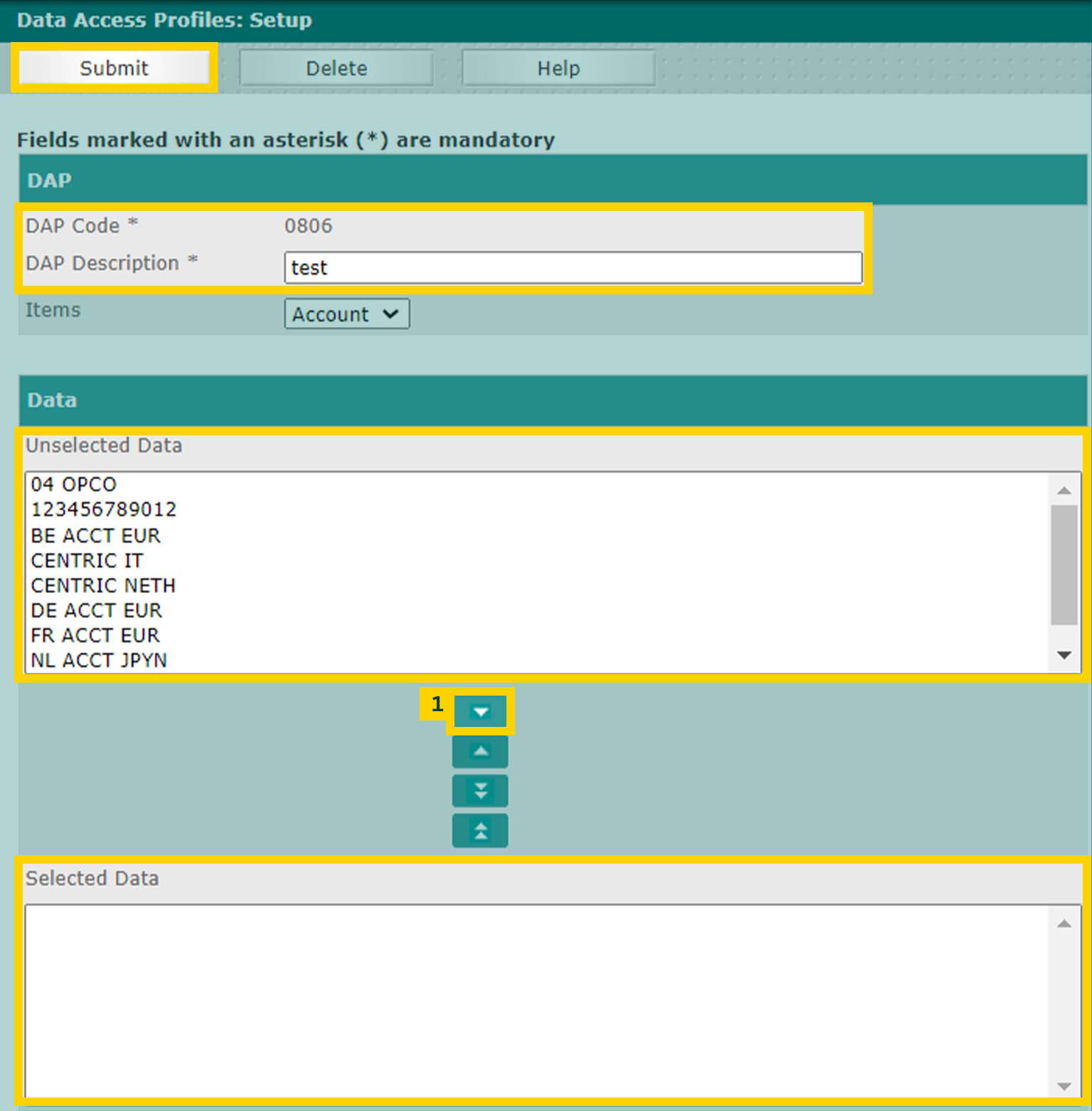
- Name the Data Access Profile by thinking up and entering a DAP-code and DAP Description.
- Select the accounts(s).
- Click on button (1) to move the accounts you want in the profile one by one, from
Unselected Data to Selected Data. - Click Submit.
You see the message 'Saved Successfully'. - To create another Data Access Profile, repeat steps 1 to 5.
- Activate the new Data Access Profiles by confirming them in the authorisation overview.