
Track the status of a payment
In Access Online, a payment is assigned a status as soon as it is entered. Under Payment tracking, you can view the status of all your payments.
Overview of payment statuses
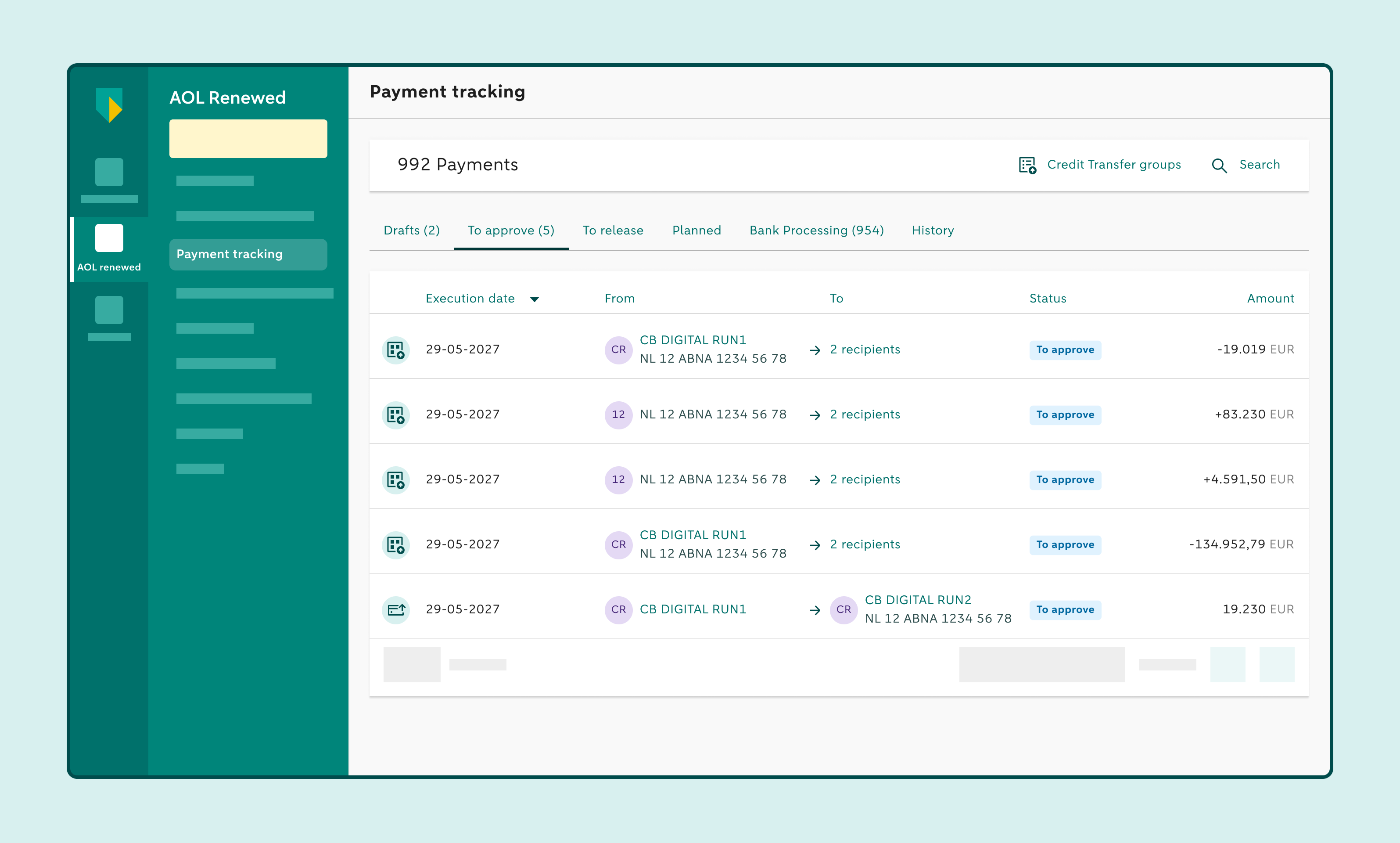
Under Payment tracking, payments are grouped into six categories:
- Drafts – payments that have not yet been sent to the task list.
- To approve – payments that still need to be approved.
- To release – payments that are ready to be sent to the bank.
- Planned – approved payments with a future date.
- Bank processing – payments that are still being processed by the bank.
- History – payments that have been processed, delivered to the recipient, deleted or cancelled.
Saving payments as drafts
If you don’t want to have a payment approved just yet, save the payment as a draft. The payment won’t yet appear in the task list and won’t be visible to users who are authorised to approve payments.
Once the payment is ready for approval, simply click Track payments and choose Drafts to open the draft. You can then send the payment to the task list where it can be viewed and approved.
How to search for a payment
Click on Track payment
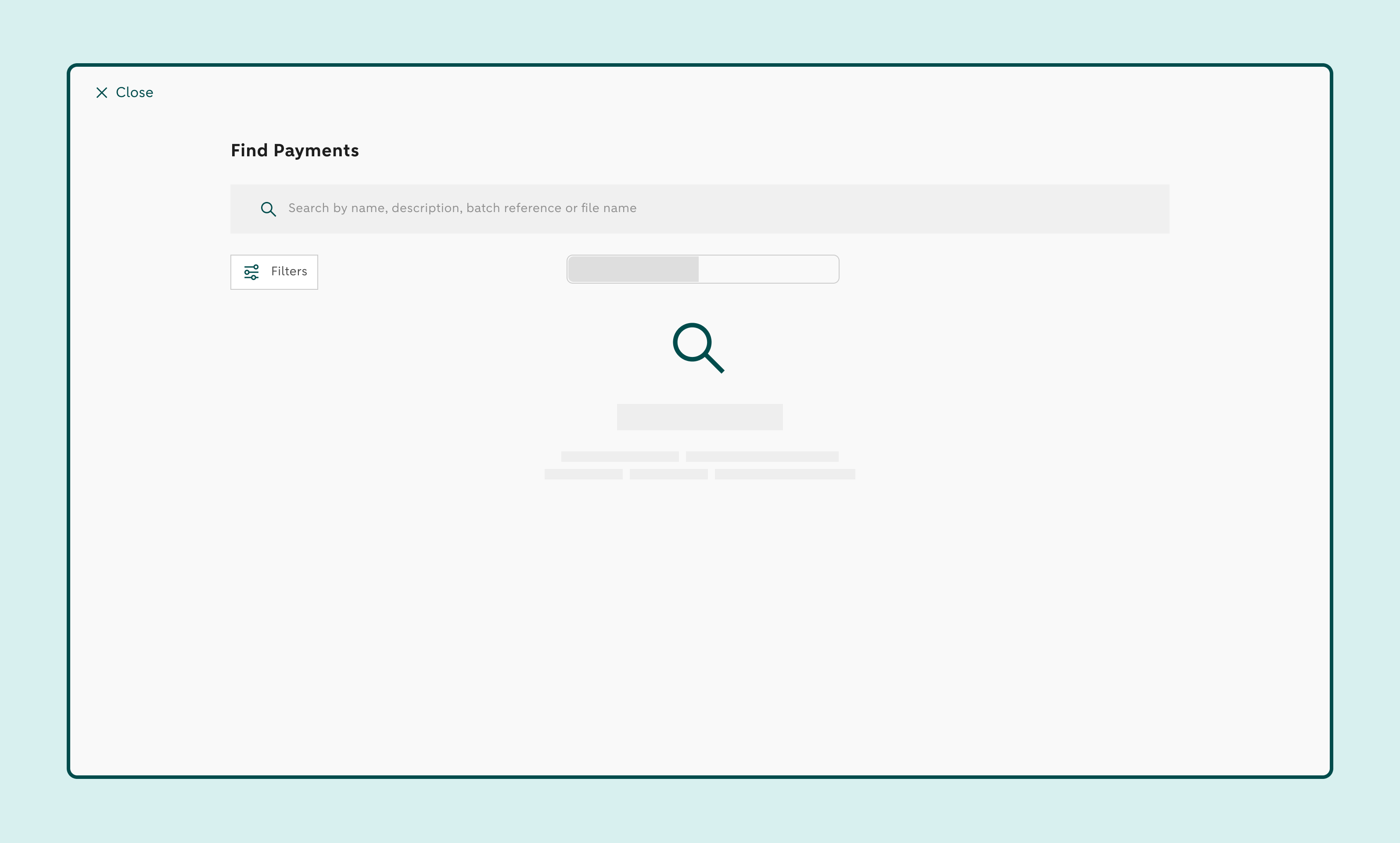
Use the search field to find a payment
You can search by name, description, batch reference, or file name.
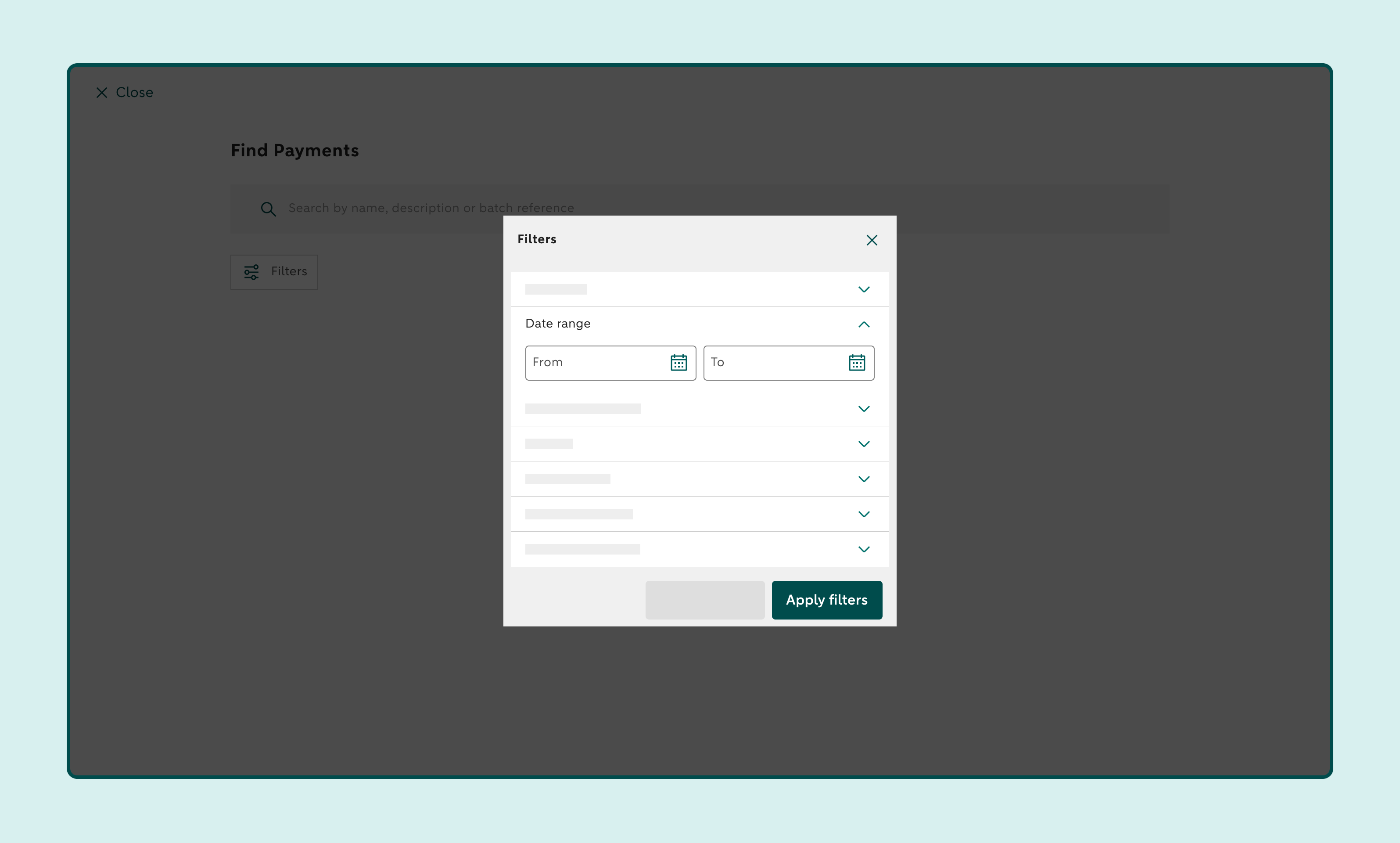
Use the filters to further refine the search results
You can filter by:
- Amount range
- Date range
- Type of payment
- Status
- Transfer currency
- Ordering account
- Payment origin
Downloading pacs.008
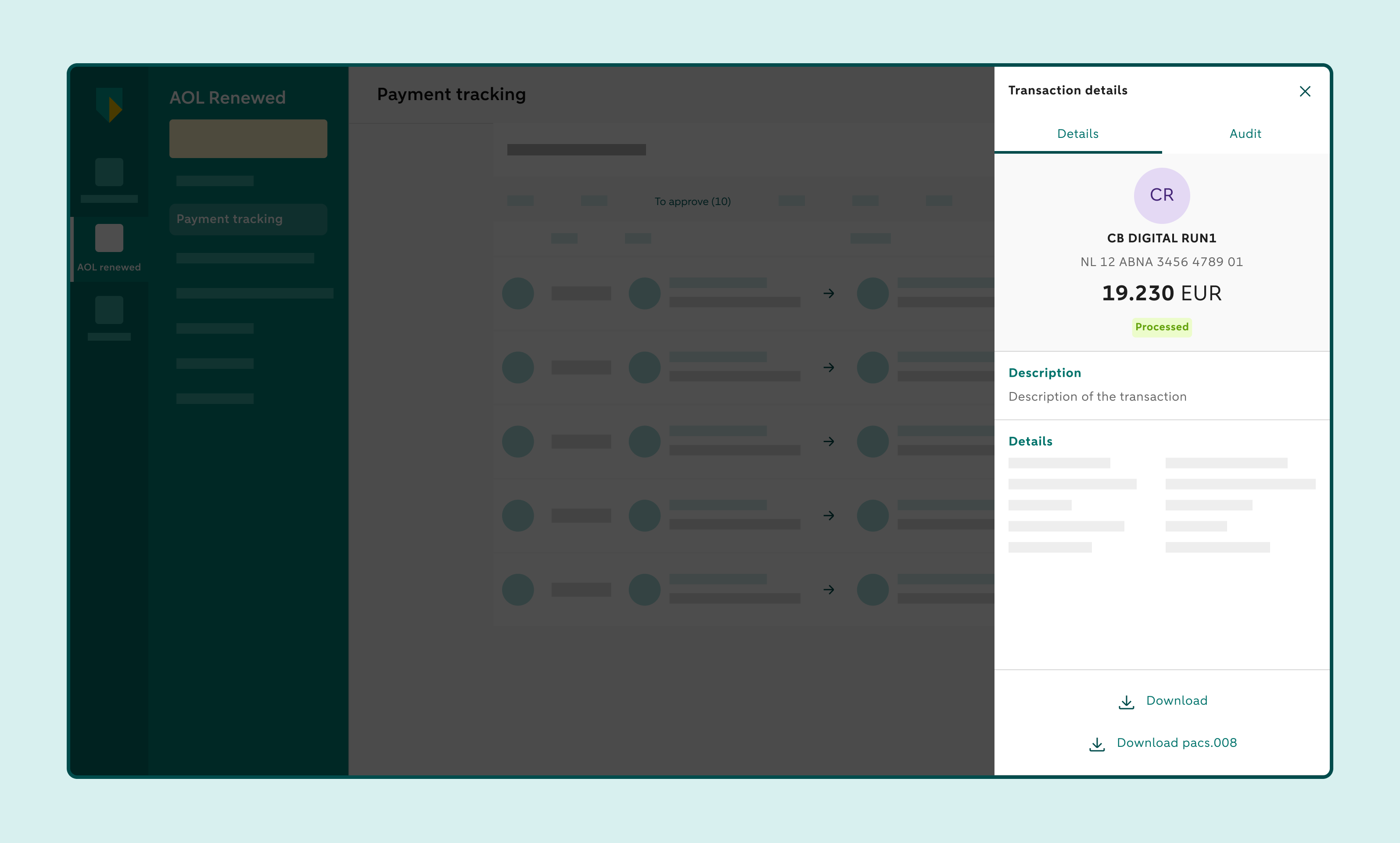
A pacs.008 document contains the details of a non-SEPA credit transfer. If you want to download a pacs.008 document, click Track payments to find the non-SEPA credit transfer. You have 60 days to download the document under Process bank or History. You can also use the search field to find the credit transfer.
Click the credit transfer and click Download pacs.008 if you can see this button. A PDF will be generated, which you can download and save.
Meaning of payment statuses
Single payment entered manually
| Status | Explanation |
| Pending approval | The transfer has been created and is awaiting approval. |
| Ready for Release | The approved transfer can be released if you have chosen to manually release transfers. |
| Partially Approved | This transfer has already been approved by at least one person. One or more additional approvals are still required. |
| In Process | We are processing your transfer. |
| Awaiting Confirmation | We are waiting for confirmation from the recipient’s bank. |
| Scheduled | These transfers have been fully approved and will be processed on the requested execution date. |
| Scheduled / Cancellation Pending Approval | The cancellation of the scheduled transfer is awaiting approval. |
| Scheduled / Cancellation in Process | The cancellation of the scheduled transfer is being processed. |
| Scheduled / Cancellation Removed | The cancellation of the scheduled transfer has been removed. |
| Scheduled / Cancellation Rejected | The cancellation has been rejected. The transfer is already being processed. |
| Cancelled | The scheduled transfer has been cancelled. |
| Balance Check | We are checking whether there are sufficient funds in your account. You can also check this yourself and add funds if necessary. |
| Rejected | Your transfer has been rejected. This can happen for various reasons. You can find the reason in the transaction details. |
| Processing Error | An error occurred during processing. Please submit your transfer again. If this happens repeatedly, contact us. |
| Processed | Your transfer has been processed. |
| Received by Recipient | The recipient has received the funds. |
| Removed | The transfer has been removed. |
Single payment uploaded
| Status | Explanation |
| Pending approval | The transfer has been created and is awaiting approval. |
| Ready for Release | The approved transfer can be released if you have chosen to manually release transfers. |
| Partially Approved | This transfer has already been approved by at least one person. One or more additional approvals are still required. |
| In Process | We are processing your transfer. |
| Awaiting Confirmation | We are waiting for confirmation from the recipient’s bank. |
| Scheduled | These transfers have been fully approved and will be processed on the requested execution date. |
| Scheduled / Cancellation Pending Approval | The cancellation of the scheduled transfer is awaiting approval. |
| Scheduled / Cancellation in Process | The cancellation of the scheduled transfer is being processed. |
| Scheduled / Cancellation Removed | The cancellation of the scheduled transfer has been removed. |
| Scheduled / Cancellation Rejected | The cancellation has been rejected. The transfer is already being processed. |
| Cancelled | The scheduled transfer has been cancelled. |
| Balance Check | We are checking whether there are sufficient funds in your account. You can also check this yourself and add funds if necessary. |
| Rejected | Your transfer has been rejected. This can happen for various reasons. You can find the reason in the transaction details. |
| Processing Error | An error occurred during processing. Please submit your transfer again. If this happens repeatedly, contact us. |
| Processed | Your transfer has been processed. |
| Received by Recipient | The recipient has received the funds. |
| Removed | The transfer has been removed. |
Transaction in an uploaded payment batch
| Status | Explanation |
| Pending approval | The transfer has been created and is awaiting approval. |
| Ready for Release | The approved transfer can be released if you have chosen to manually release transfers. |
| Partially Approved | This transfer has already been approved by at least one person. One or more additional approvals are still required. |
| In Process | We are processing your transfer. |
| Awaiting Confirmation | We are waiting for confirmation from the recipient’s bank. |
| Scheduled | These transfers have been fully approved and will be processed on the requested execution date. |
| Scheduled / Cancellation Pending Approval | The cancellation of the scheduled transfer is awaiting approval. |
| Scheduled / Cancellation in Process | The cancellation of the scheduled transfer is being processed. |
| Scheduled / Cancellation Removed | The cancellation of the scheduled transfer has been removed. |
| Scheduled / Cancellation Rejected | The cancellation has been rejected. The transfer is already being processed. |
| Cancelled | The scheduled transfer has been cancelled. |
| Balance Check | We are checking whether there are sufficient funds in your account. You can also check this yourself and add funds if necessary. |
| Rejected | Your transfer has been rejected. This can happen for various reasons. You can find the reason in the transaction details. |
| Processing Error | An error occurred during processing. Please submit your transfer again. If this happens repeatedly, contact us. |
| Processed | Your transfer has been processed. |
| Received by Recipient | The recipient has received the funds. |
| Removed | The transfer has been removed. |
Transaction in an uploaded direct debit batch
| Status | Explanation |
| Pending Acceptance | The request must be accepted. |
| Pending Approval | The transfer has been created and is awaiting approval. |
| Ready for Release | The approved transfer can be released if you have chosen to manually release transfers. |
| Partially Approved | This transfer has already been approved by at least one person. One or more additional approvals are still required. |
| In Process | We are processing your transfer. |
| Clearing | Sent to Clearing. |
| Clearing / Cancellation Request Pending Approval | Your cancellation request has been created and is awaiting approval. |
| Clearing / Cancellation Request Removed | Your cancellation request has been removed. |
| Clearing / Cancellation Request in Process | Your cancellation request is being processed. |
| Cancelled in Clearing | Your transfer has been cancelled in clearing. |
| Settled | The direct debit has been processed. |
| Settled / Reversal Entry Pending Approval | You must approve the reversal entry. |
| Settled / Partially Approved Reversal Entry | Not all required approvals have been completed for the reversal entry. |
| Settled / Reversal Entry Ready for Release | The reversal entry has been approved and can be released. |
| Settled / Reversal Entry Removed | The reversal entry has been removed. |
| Settled / Reversal Entry Rejected | The reversal entry has been rejected. |
| Settled / Reversal Entry in Balance Check | There are insufficient funds available to process the reversal entry. |
| Reversed | The payer has been refunded at the initiative of the direct debit originator. |
| Rejected by Payer | The direct debit has been rejected by the payer. |
| Chargeback by Payer | The payer has reversed the transfer. |
| Scheduled | These transfers have been fully approved and will be processed on the requested execution date. |
| Scheduled / Cancellation Pending Approval | The cancellation of the scheduled transfer is awaiting approval. |
| Scheduled / Cancellation in Process | The cancellation of the scheduled transfer is being processed. |
| Scheduled / Cancellation Removed | The cancellation of the scheduled transfer has been removed. |
| Scheduled / Cancellation Rejected | The cancellation has been rejected. The transfer is already being processed. |
| Cancelled | The scheduled transfer has been cancelled. |
| Balance Check | We are checking whether there are sufficient funds in your account. You can also check this yourself and add funds if necessary. |
| Rejected | Your transfer has been rejected. This can happen for various reasons. You can find the reason in the transaction details. |
| Returned | Your transfer has been returned. |
| Processing Error | An error occurred during processing. Please submit your transfer again. If this happens repeatedly, contact us. |
| Processed | Your transfer has been processed. |
| Received by Recipient | The recipient has received the funds. |
| Removed | The transfer has been removed. |